Local AI WhatsApp Assistant
The Challenge
Customers expect fast answers on WhatsApp, but small teams cannot monitor every conversation. Generic chatbots can invent prices, overstate availability, or imply that a booking is confirmed when the owner has not approved it.
The Solution
Built a configurable FastAPI application that grounds Gemini in owner-approved business settings and FAQs. The model returns typed decisions, while Pydantic and Python enforce booking, capacity, timezone, idempotency, and security rules before SQLite records are changed.
Local-First Conversation Control Plane
A small-business front desk where the model proposes decisions and deterministic Python rules decide what is allowed.
- ✓Owner-managed business profile and approved FAQ knowledge base
- ✓Grounded multilingual customer responses through Gemini
- ✓Structured booking and qualified lead capture
- ✓Human approval workflow for pending customer requests
- ✓Twilio signature validation and authenticated JSON webhooks
- ✓Rate limiting, message deduplication, and privacy-aware audit logs
- ✓Responsive owner dashboard and built-in conversation simulator
- ✓35 automated tests across data, model, webhook, and dashboard boundaries
Case Study: Local AI WhatsApp Assistant
Most small businesses do not need another generic chatbot. They need a reliable front desk that can answer repetitive questions, qualify a customer, collect a booking request, and hand the outcome to a human owner.
That is the idea behind the Local AI WhatsApp Assistant: a configurable, local-first application for gyms, clinics, salons, cafes, tutors, repair services, consultants, and other appointment- or lead-driven businesses.
The application combines:
- a WhatsApp-compatible webhook;
- an owner-managed knowledge base;
- Gemini structured output for language understanding;
- Python and Pydantic validation for every database-changing action;
- a local SQLite database for business records;
- a responsive owner dashboard; and
- human approval for customer booking requests.
The result is not simply a chat interface. It is a practical sales and operations system designed to move a conversation toward a measurable business outcome.
Commercial promise: respond faster, capture more opportunities, reduce repetitive front-desk work, and retain owner control over every booking and lead.

The Business Problem
A customer rarely experiences a business as a collection of software tools. They experience one conversation:
- "Are you open today?"
- "How much does it cost?"
- "Can I book an assessment?"
- "Can somebody call me?"
When those messages sit unanswered, the business risks losing the customer at the moment of highest intent. A conventional chatbot can reply quickly, but a fast wrong answer is not an improvement. It can invent a price, imply that a slot is confirmed, or give an answer that no longer reflects the owner's policy.
The Local AI WhatsApp Assistant addresses that problem with a controlled workflow:
- The owner defines the business identity, hours, location, languages, and greeting.
- The owner adds approved FAQ answers.
- The model interprets the customer's natural-language message.
- The model returns a typed decision rather than directly changing data.
- Python validates the decision and applies business rules.
- Bookings enter the system as pending requests.
- The owner reviews, approves, cancels, or completes each request.
This separation between conversation and authority is the central design choice. The AI can help the customer, but the application remains responsible for deciding what is allowed to become a business record.
Product Tour
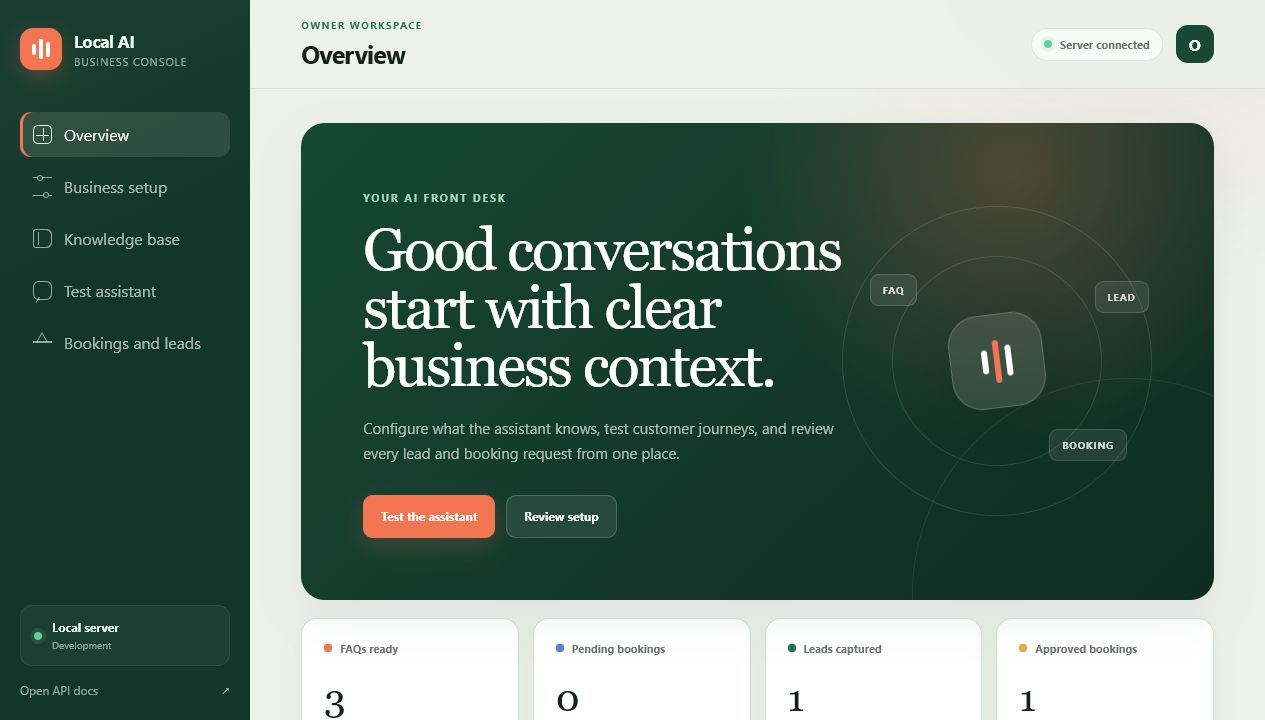
1. Owner Overview
The overview gives the owner a concise operating picture:
- number of approved FAQs;
- pending and approved bookings;
- captured sales leads;
- Gemini, database, webhook, and Twilio readiness;
- recent customer activity.
This matters commercially because automation should not make customer activity less visible. The dashboard turns AI conversations into an owner-readable pipeline.
2. Business Setup
The assistant's system context is generated from owner-controlled fields:
- business name and category;
- factual description;
- address or service area;
- working hours;
- IANA timezone;
- supported languages;
- booking duration and capacity;
- customer greeting.
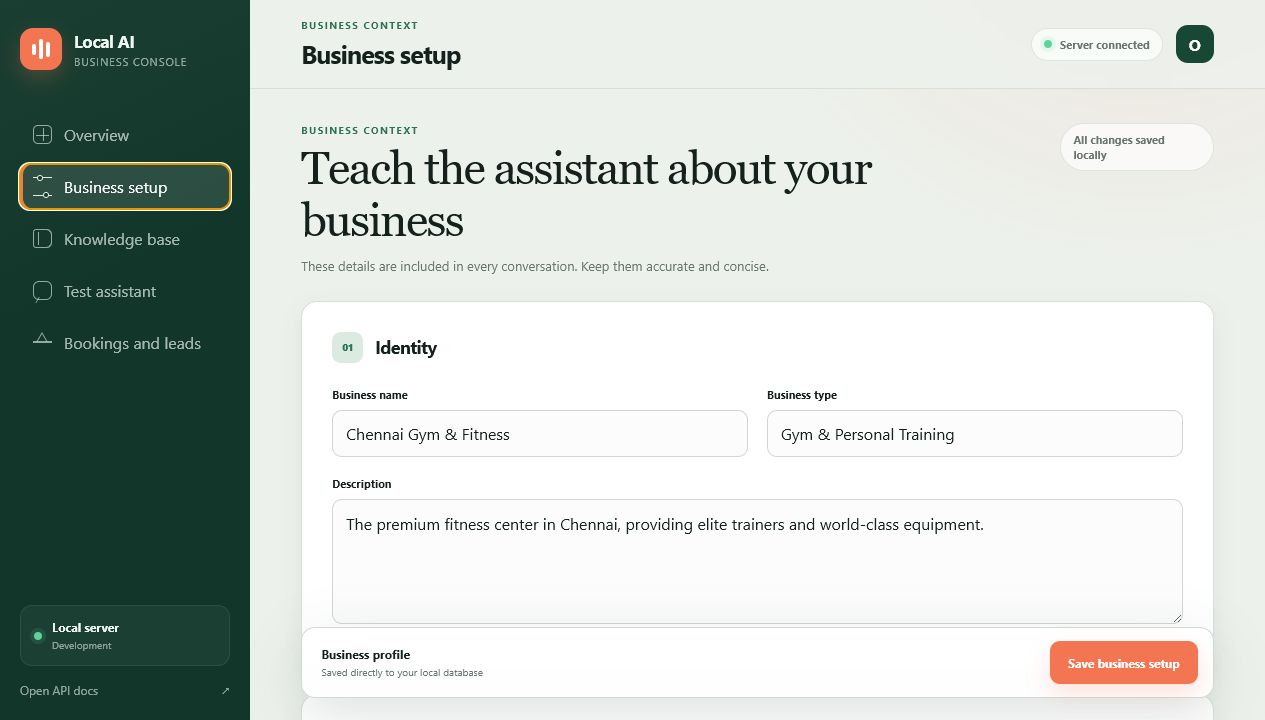
The timezone is not decorative metadata. It is used when the model resolves phrases such as "tomorrow at 10 AM" and when the application verifies that a requested appointment is in the future.
3. Approved Knowledge Base
Owners can add and remove FAQ pairs without changing Python code. These answers become grounding context for every customer conversation.
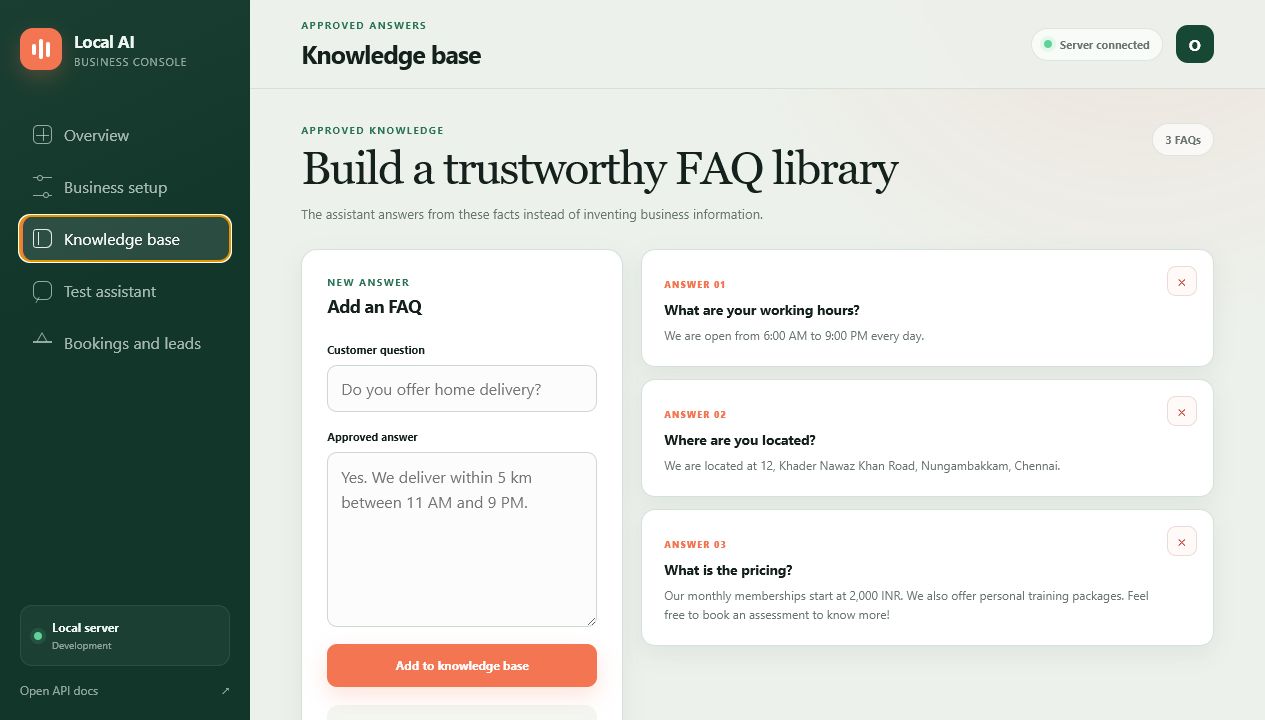
The current demo includes exact answers for:
- working hours;
- business location; and
- starting membership prices.
The prompt explicitly tells the model not to invent prices, availability, policies, guarantees, or professional advice. This does not make hallucination mathematically impossible, but it materially reduces risk by restricting the allowed source context and validating all structured actions outside the model.
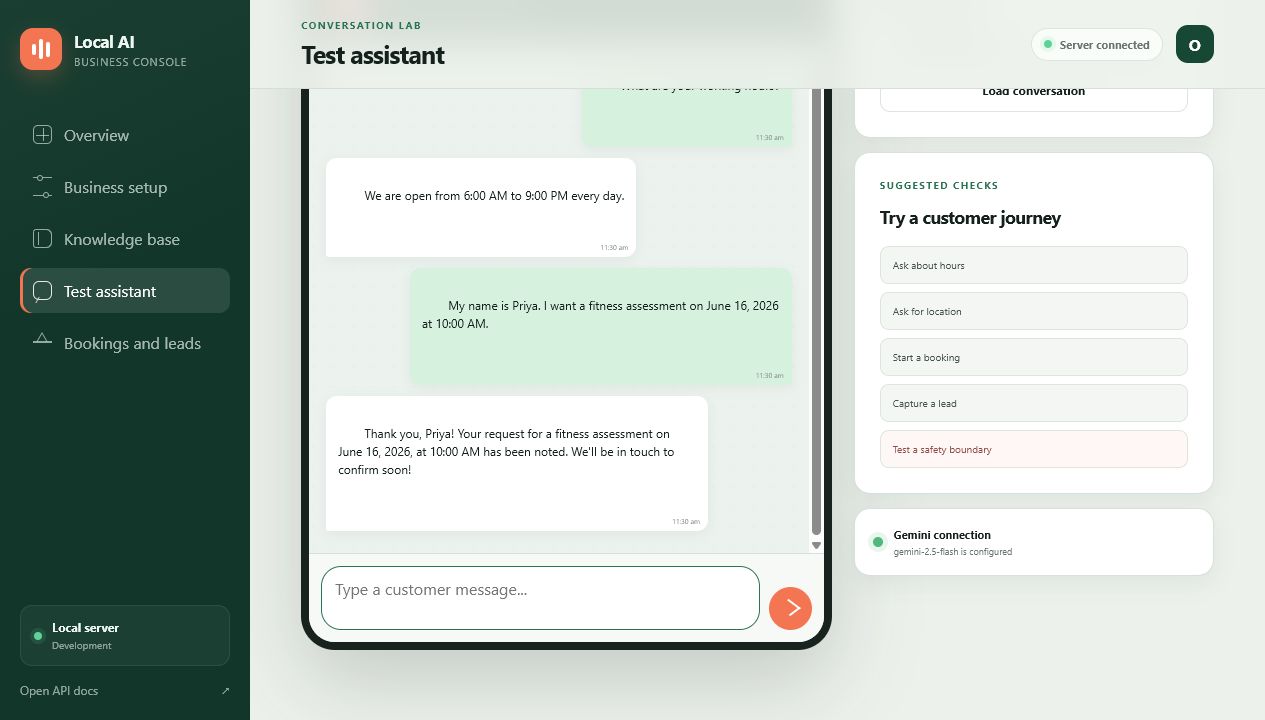
4. Conversation Lab
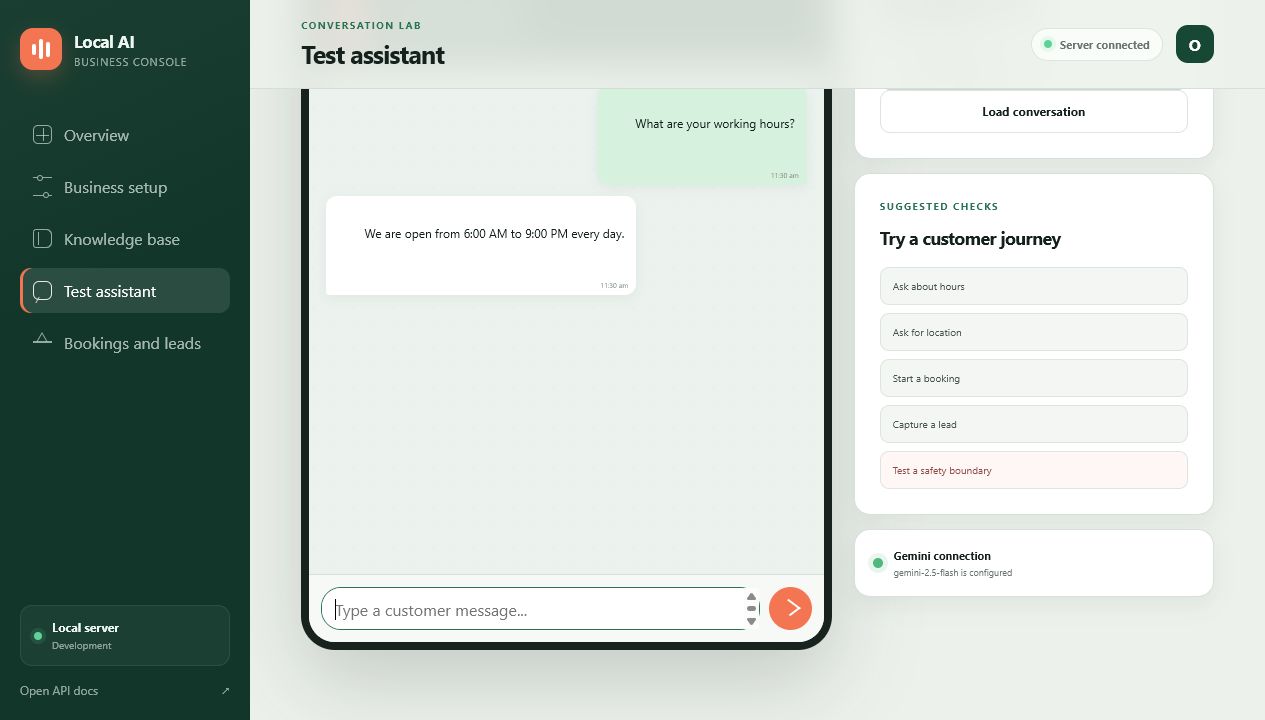
The dashboard includes a built-in customer simulator. It uses the same knowledge, Gemini model, database, and action-validation path as the WhatsApp webhook.
That gives an owner or implementation consultant a safe place to test:
- factual FAQ responses;
- missing-information prompts;
- future booking requests;
- callback and sales-lead capture;
- attempts to override the assistant's instructions.
5. Bookings and Leads
The application converts useful conversations into structured outcomes.
A booking stores:
- customer name;
- customer phone;
- requested service;
- the customer's original time wording;
- normalized ISO 8601 appointment time;
- business timezone;
- status;
- source message identifier.
A lead stores:
- customer name;
- customer phone;
- explicit requirement;
- capture time;
- source message identifier.
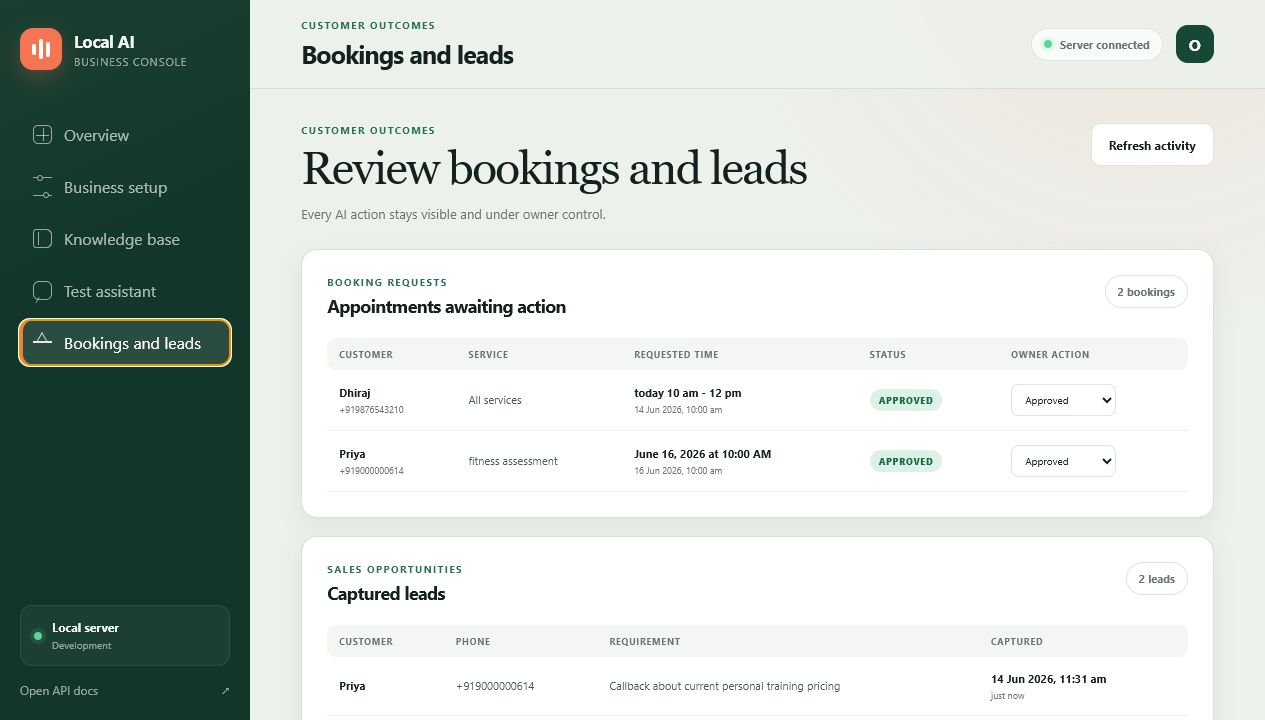
The owner can move a booking through pending, approved, cancelled, and
completed states. The assistant records intent; the business retains the
final decision.
Live Demo: From Question to Conversion
The accompanying demo uses a fictional Chennai gym and a synthetic customer named Priya.
The demonstrated journey is:
| Stage | Customer or owner action | Application behavior |
|---|---|---|
| FAQ | "What are your working hours?" | Answers with the approved 6:00 AM to 9:00 PM schedule. |
| Booking | Priya requests a fitness assessment on June 16, 2026 at 10:00 AM. | Gemini returns structured booking data; Python verifies a future timezone-aware timestamp and stores a pending request. |
| Lead | Priya requests a callback about personal training pricing. | The assistant captures a qualified sales requirement in the lead table. |
| Review | The owner opens Bookings and Leads. | Both conversion outcomes are visible with customer details and timestamps. |
| Approval | The owner changes Priya's booking to approved. | The status and dashboard metrics update immediately. |
System Architecture
Customer on WhatsApp
        |
        v
Twilio WhatsApp webhook or authenticated JSON client
        |
        v
FastAPI request boundary
  - body-size limit
  - bearer-token authentication
  - Twilio signature verification
  - per-sender rate limiting
  - MessageSid/message_id deduplication
        |
        v
LLMManager
  - business settings
  - approved FAQs
  - recent conversation history
  - Gemini structured JSON response
        |
        v
Pydantic AssistantDecision validation
  - none | booking | lead
  - required field validation
  - maximum field lengths
  - timezone-aware datetime parsing
        |
        v
Python business rules
  - future booking enforcement
  - slot overlap and capacity checks
  - source-message idempotency
        |
        v
SQLite
  - settings and FAQs
  - chat history
  - bookings and leads
  - inbound delivery state
        |
        v
Owner dashboard and human approval
The implementation is intentionally modular:
| Module | Responsibility |
|---|---|
config.py | Loads environment-driven runtime, security, retention, model, and path settings. |
database.py | Owns schema initialization, migrations, transactions, CRUD, booking capacity, and idempotency. |
llm_manager.py | Builds grounded prompts, requests structured model output, validates decisions, and executes allowed actions. |
whatsapp_server.py | Exposes FastAPI endpoints and enforces webhook security and delivery controls. |
dashboard.py | Serves the owner API, validates dashboard payloads, and protects production access. |
static/ | Provides the dependency-free responsive owner interface. |
admin_panel.py | Supplies terminal-based settings, FAQ, booking, lead, and CSV export operations. |
simulator.py | Provides a local terminal conversation test environment. |
Why Structured Output Matters
The model does not receive an open-ended instruction such as "create a booking
when appropriate." It must return JSON matching an AssistantDecision schema.
Conceptually, the result looks like this:
{
  "reply": "Thank you, Priya. Your booking request has been noted.",
  "action_type": "booking",
  "customer_name": "Priya",
  "service": "Fitness assessment",
  "requested_time": "June 16, 2026 at 10:00 AM",
  "scheduled_for": "2026-06-16T10:00:00+05:30",
  "requirement": null
}
Pydantic rejects unexpected fields and incomplete actions. A booking requires a name, service, customer-readable time, and normalized timestamp. A lead requires a name and a clear requirement.
Even a schema-valid decision is not automatically trusted. Python performs the next layer of checks:
- the timestamp must include a timezone offset;
- the appointment must be in the future;
- the requested slot must not exceed configured capacity;
- overlapping appointments respect the configured duration;
- a repeated source message cannot create the same booking or lead twice.
If validation or model processing fails, the assistant returns a safe fallback and does not write an uncertain action.
Webhook Reliability and Security
Signed Twilio Requests
For Twilio traffic, the server validates X-Twilio-Signature against the exact
configured public webhook URL. An invalid signature is rejected before the
message reaches the model.
Authenticated JSON Clients
Non-Twilio integrations can send JSON with a bearer token or
X-Webhook-Token. Production mode requires webhook authentication.
Idempotent Delivery
Messaging providers retry requests. Without idempotency, one customer message could create duplicate bookings or leads.
The application claims each inbound MessageSid or message_id in an
inbound_messages table. Completed duplicate deliveries return the stored
response instead of executing the action again.
Rate and Size Limits
The API rejects oversized requests and applies a sliding-window rate limit per sender. The current limiter is process-local; a multi-worker or multi-server deployment should move this state to Redis or another shared store.
Private-by-Default Audit Logs
Outbound audit entries include a masked phone number, response length, SHA-256
digest, timestamp, and status. Message bodies are excluded unless
LOG_MESSAGE_CONTENT is deliberately enabled.
Privacy: What "Local-First" Means
The application stores business settings, FAQs, chat history, bookings, leads, and inbound delivery state in a local SQLite database.
However, the current Gemini configuration sends conversation context to Google's model API to generate a response. It should therefore be described as local-first, not fully offline.
A responsible production deployment should:
- obtain appropriate customer consent;
- document the external model processor;
- minimize retained chat history;
- keep message-content logging disabled;
- encrypt the host disk and backups;
- restrict access to
.env, the database, exports, and logs; - use HTTPS and a stable public hostname;
- configure dashboard authentication;
- define escalation rules for sensitive or unsupported requests.
For organizations that require a completely local inference boundary, the
LLMManager can be adapted to a local model while preserving the rest of the
validation and persistence architecture.
Deployment Model
The current design favors one isolated deployment per business. Each client receives its own:
- database;
- credentials;
- approved knowledge base;
- conversation history;
- owner dashboard;
- retention and capacity settings.
This model is attractive for consultants and managed automation providers because it creates a clear privacy and operational boundary between customers.
A practical production path is:
- Configure the business and approved FAQ set.
- Test common, incomplete, and adversarial conversations locally.
- Connect a Twilio WhatsApp sandbox.
- Run a limited pilot with human review of every booking and lead.
- Measure response time, qualified leads, booking completion, and handoffs.
- Add encrypted backups, monitoring, and shared rate limiting.
- Move to a managed database only when scale requires it.
Quality Assurance
The project includes 35 automated tests covering:
- database initialization and migrations;
- settings and FAQ CRUD;
- chat retention;
- future booking enforcement;
- booking overlap and capacity;
- action idempotency;
- structured model output validation;
- safe fallback behavior;
- JSON webhook authentication;
- Twilio signature validation;
- TwiML escaping;
- duplicate message delivery;
- request-size limits;
- dashboard authentication;
- dashboard settings, chat, FAQs, bookings, and leads;
- admin lead export.
This matters to a buyer because the product is not relying on prompt quality alone. The deterministic boundaries around the model are tested as normal application code.
The Commercial Opportunity
The strongest fit is a business where customer conversations frequently become one of three outcomes:
- an answered question;
- a booking request;
- a qualified callback lead.
Examples include:
- gyms and personal trainers;
- dental and wellness clinics;
- salons and spas;
- tutors and training centers;
- cafes and caterers;
- home-service and repair companies;
- consultants and local agencies.
The implementation can be sold as:
- a one-time setup and customization project;
- a monthly managed automation service;
- a vertical package for one industry;
- an internal front-desk tool for a multi-location business.
The value proposition is straightforward:
- customers receive an immediate response;
- staff spend less time repeating basic information;
- sales intent becomes structured data;
- bookings remain subject to owner approval;
- the business keeps control of its own operational records;
- the system can be adapted without adopting a rigid chatbot platform.
What I Would Add for Larger Deployments
The current application is a strong pilot and single-business foundation. A larger commercial rollout should add:
- PostgreSQL for higher concurrency;
- Redis-backed distributed rate limiting;
- encrypted automated backups;
- central metrics and alerting;
- role-based dashboard access;
- message queues for resilient processing;
- explicit human handoff and escalation;
- consent and deletion workflows;
- tenant provisioning if moving to a shared SaaS architecture;
- analytics for lead-to-booking conversion and response latency.
These are scaling investments, not prerequisites for proving the customer journey.
Start With a Focused Pilot
The best implementation begins with one business, one clear set of approved answers, and a small number of measurable customer outcomes.
For a pilot, I recommend:
- 10 to 25 high-frequency FAQs;
- one booking workflow;
- one callback or sales-lead workflow;
- human review of every generated action;
- a weekly review of failed, ambiguous, and escalated conversations.
That is enough to learn where automation creates value without asking the AI to run the business unsupervised.
Build Your AI Front Desk
The Local AI WhatsApp Assistant is designed for businesses that want the speed of AI without surrendering control of customer outcomes.
If your customers already ask questions, request appointments, or seek pricing through WhatsApp, this application can turn those conversations into a structured, reviewable workflow tailored to your business.
Dhiraj Das
Automation Architect & Consultant
Next step: schedule a discovery session to map your FAQs, booking rules, lead qualification flow, privacy requirements, and WhatsApp integration.