Automation
AI
Test Automation
Building pytest-glow-report: Beautiful Test Reports for the Modern Era

Building pytest-glow-report: Beautiful Test Reports for the Modern Era

December 8, 2025 4 min read
🎯

Report Highlights

  • Zero Config: pip install & go
  • Executive Summary: Quality score, risk, & KPIs
  • Beautiful UI: Glassmorphism, animations, dark mode
  • Interactive: Filterable results & copy-to-email
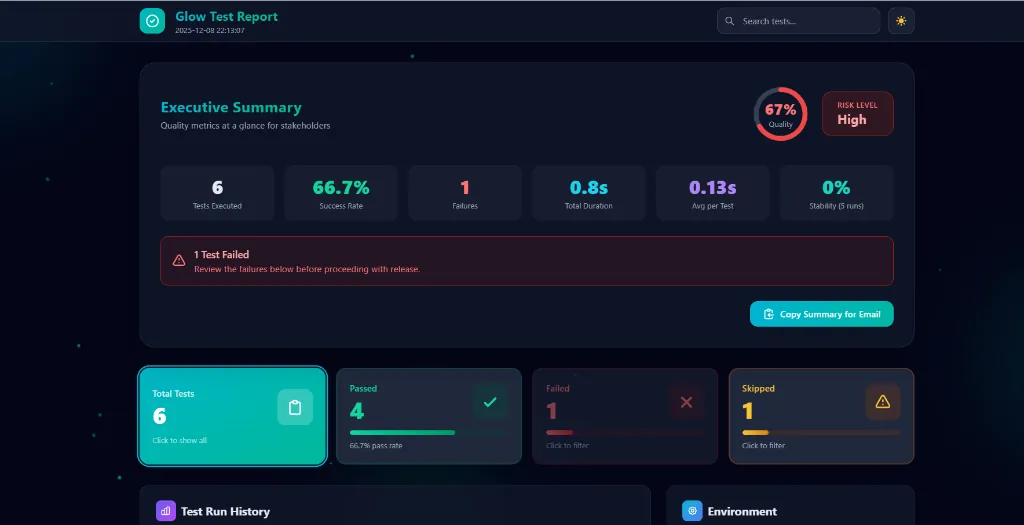
pytest-glow-report Executive Summary Dashboard
Click to zoom

The Executive Summary dashboard showing quality metrics at a glance

Why This Exists
Because "FAILED test_login.py" means nothing to a Product Manager. They need context, trends, and a clear Go/No-Go signal.
πŸ“Š

If you've ever worked in a QA or software development team, you know the struggle. After every test run, someone asks: *"Did the tests pass?"* The answer usually involves opening a terminal, scrolling through walls of text, and trying to explain what `FAILED test_checkout.py::test_payment_validation - AssertionError` means to your product manager.

Traditional test output is designed for developers, not for the entire team. Product managers want a quick status. QA leads want trends. Executives want a go/no-go decision for release. That's why I built pytest-glow-report.

What is pytest-glow-report?

It's a zero-configuration HTML reporting plugin for PyTest and Python's unittest framework that generates beautiful, interactive reports with:

  • Executive Summary Dashboard β€” Quality scores, risk levels, and business-friendly KPIs
  • Interactive Filtering β€” Click summary cards to filter by passed/failed/skipped
  • Dark/Light Mode β€” Because your eyes matter at 2 AM debugging sessions
  • Test History Tracking β€” SQLite-backed trends over multiple runs
  • Screenshot Support β€” Embed screenshots from Selenium or Playwright
  • Copy to Email β€” One-click copy of formatted summary for stakeholders

The Design Philosophy

1. Zero Configuration

The best tools are the ones that just work. Install the package, run your tests, get a report:

Code
pip install pytest-glow-report
pytest
# Report generated at reports/report.html

No configuration files. No command-line flags. No setup code in conftest.py. It just works.

2. Enterprise-Ready

I've worked in large organizations where test reports need to answer questions like: *"What's our quality score?"*, *"Is it safe to release?"*, *"How has stability trended over the sprint?"*

The Executive Summary panel answers all of these at a glance:

  • Quality Score β€” Circular progress showing pass rate
  • Risk Level β€” Automatically calculated as Low/Medium/High
  • 6 Business KPIs β€” Tests executed, success rate, failures, duration, average per test, stability
  • Release Readiness β€” Clear green/red status message

3. Beautiful by Default

I'm tired of ugly developer tools. Life's too short for Comic Sans and #FF0000 error text. pytest-glow-report uses:

  • Glassmorphism UI β€” Frosted glass effects with blur
  • Animated Backgrounds β€” Subtle floating gradient orbs
  • Particle Network β€” Connected dots that move organically
  • Smooth Animations β€” Card hovers, filtering transitions, dark mode fade
  • Modern Color Palette β€” Cyan/teal/emerald gradients instead of harsh primary colors

The first time someone opens the report, they should say *"Wow!"*

Key Features Deep Dive

πŸ“Š Interactive Summary Cards

Each summary card (Total, Passed, Failed, Skipped) is clickable. Click "Failed" and instantly see only the failing tests. Click "Total" to show all. An active filter ring and "Clear filter" link make it obvious what's being shown.

πŸ“§ Copy to Email

The Executive Summary includes a "Copy Summary for Email" button. One click copies a beautifully formatted plain-text summary with emojis:

Code
πŸ“Š TEST EXECUTION SUMMARY
━━━━━━━━━━━━━━━━━━━━━━━━

πŸ“… Date: 2025-12-08 22:09:12
🎯 Quality Score: 83.3%
⚠️ Risk Level: Medium

πŸ“ˆ RESULTS BREAKDOWN
βœ… Passed:  4
❌ Failed:  1
⏭️ Skipped: 1

πŸ“Œ STATUS
⚠️ 1 test(s) failed - Review required

Paste directly into Slack, Teams, or email. Non-technical stakeholders immediately understand the status.

πŸ“Έ Screenshot Capture

For UI tests, embed screenshots directly in the report:

Code
from beautiful_report import report

def test_login_page(driver):
    driver.get("https://example.com/login")
    report.screenshot("login_page", driver=driver)

Screenshots appear as thumbnails that enlarge on hover. No more digging through directories to find the right image.

πŸ“‹ Step Tracking

Log individual steps within complex tests:

Code
@report.step("Opening login page")
def open_login(driver):
    driver.get("/login")

@report.step("Entering credentials")
def enter_credentials(driver, user, password):
    driver.find_element("id", "username").send_keys(user)
    driver.find_element("id", "password").send_keys(password)

def test_login_flow(driver):
    open_login(driver)
    enter_credentials(driver, "admin", "secret")

Each step shows its name, duration, and pass/fail status. Great for debugging where exactly a test failed.

🌐 Environment Configuration

Configure everything via environment variables β€” perfect for CI/CD:

Code
export GLOW_REPORT_TITLE="E-Commerce Regression"
export GLOW_TEST_TYPE="Regression"
export GLOW_BROWSER="Chrome 120"
export GLOW_DEVICE="Windows 11"
export GLOW_ENVIRONMENT="Staging"
pytest

All of these appear in the Environment panel of the report.

Technical Implementation

The plugin uses a clean separation of concerns:

  • plugin.py β€” PyTest hooks (`pytest_configure`, `pytest_runtest_logreport`, `pytest_sessionfinish`)
  • unittest_runner.py β€” Custom `TestRunner` for unittest compatibility
  • core.py β€” `ReportBuilder` class that collects results and renders HTML
  • decorators.py β€” `@report.step()` and `report.screenshot()` API
  • templates/report.html.jinja2 β€” Jinja2 template with TailwindCSS and Alpine.js

Why Jinja2 + TailwindCSS + Alpine.js?

  • Jinja2 β€” Industry-standard Python templating. Easy to customize.
  • TailwindCSS (CDN) β€” Utility-first CSS means the template is self-contained. No build step.
  • Alpine.js (CDN) β€” Reactive JS for filtering and search without React/Vue complexity.

The entire report is a single HTML file with no external dependencies (except CDN). You can email it directly, open it offline, or host it anywhere.

SQLite for History

Each test run is recorded in `reports/history.sqlite`. The report shows a stacked bar chart of the last 10 runs, so you can see if quality is improving or degrading.

Installation & Usage

Code
# Installation
pip install pytest-glow-report

# PyTest (Automatic)
pytest

# Unittest
glow-report run -- unittest discover tests

# Output
# reports/
# β”œβ”€β”€ report.html      # Interactive HTML report
# β”œβ”€β”€ report.json      # Machine-readable results
# └── history.sqlite   # Test run history

Conclusion

Test reports shouldn't be an afterthought. They're a communication tool for the entire team β€” developers, QA engineers, product managers, and executives.

pytest-glow-report transforms raw test output into something stakeholders can understand (Executive Summary, Risk Level), developers can debug with (Steps, Screenshots, Error Tracebacks), and teams can track over time (History Charts). And it does it all with zero configuration.

Try it today:

Code
pip install pytest-glow-report
pytest
# Open reports/report.html and enjoy ✨

PyPI: pypi.org/project/pytest-glow-report

GitHub: github.com/godhiraj-code/pytest-glow-report

Dhiraj Das

About the Author

Dhiraj Das is a Senior Automation Consultant specializing in Python, AI, and Intelligent Quality Engineering. Beyond delivering enterprise solutions, he dedicates his free time to tackling complex automation challenges, publishing tools like sb-stealth-wrapper and lumos-shadowdom on PyPI.

Share this article:

Get In Touch

Interested in collaborating or have a question about my projects? Feel free to reach out. I'm always open to discussing new ideas and opportunities.